
0.0 Executive Summary
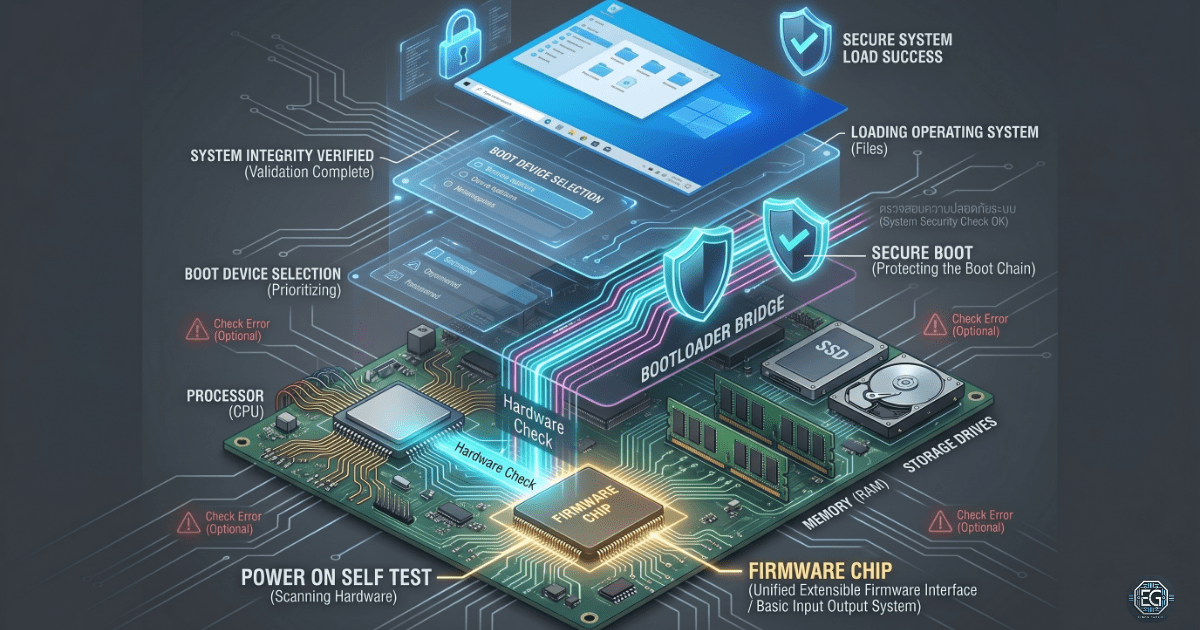
This report explains how a computer starts from a powered-off state and loads the operating system. It focuses on firmware systems called Basic Input Output System (BIOS) and Unified Extensible Firmware Interface (UEFI), along with the Power-On Self-Test (POST) process. The goal is to understand what happens before the operating system loads, including hardware checks, boot device selection, and system security control.
The result is a clear view of the startup process, which helps troubleshoot boot failures and improve system security.
1.0 BIOS, UEFI, and System Boot Architecture
1.1 Project Description
The goal of this task is to understand how a computer starts and prepares the hardware before loading the operating system.
The focus was on the startup process to:
- Understand System Startup: Reviewed each step from powering on to operating system loading.
- Identify Hardware Checks: Studied how the system verifies hardware using a power-on self-test.
- ** Understanding Boot Control:** Learning how firmware controls boot order and system startup behavior.
- ** Improving Security Awareness:** Identifying how Secure Boot protects the system from unsafe startup codes.
This helps improve the troubleshooting skills for systems that fail to boot correctly.
1.2 Technical Task / Troubleshooting Process
The process focused on how the firmware controls the system startup and how the hardware is validated before the operating system loads.
Key Actions & Observations
Firmware Execution:
- BIOS: Identified as older firmware that starts the computer and performs basic hardware initialization.
- UEFI: Identified as modern firmware that supports faster startup, larger storage drives, and stronger security features.
POST Process:
- Reviewed how the system checks the processor, memory, storage, and graphics hardware during the startup.
- Noted that failures at this stage may show error messages or beep codes if the screen is unavailable.
Complementary Metal Oxide Semiconductor Memory (CMOS) and System Configuration:
- Identified how system settings, such as boot order and time, are stored.
- Confirmed that a small battery helps preserve the settings when the system is powered off.
Boot Process Analysis:
- Reviewed how the system selects a boot device and loads the boot program.
- Identified the handoff from the firmware to the bootloader and then to the operating system.
Security Controls:
- Secure Boot: This feature checks whether boot files are trusted before allowing them to run.
- Helps prevent unauthorized or modified startup software from being loaded.
Root Cause: Most boot failures are caused by incorrect firmware settings, faulty hardware (especially memory), or incorrect boot device selection.
1.3 Resolution and Validation
The system boot process was reviewed to confirm the correct startup behavior and secure configuration.
| Parameter | Configuration Value |
|---|---|
| Firmware Mode | UEFI |
| Security Control | Secure Boot Enabled |
| System Settings Storage | CMOS |
| Boot Integrity | Validated |
Validation Steps
- Power On Self Test Check: Confirmed that hardware completed startup checks without errors.
- Boot Order Check: Confirmed the correct internal storage device is selected first.
- Security Check: Verified that Secure Boot is enabled and enforcing trusted startup files.
2.0 CONCLUSION
2.1 Key Takeaways
- The firmware starts the computer before the operating system loads.
- Power-On Self Test checks if the hardware is functioning correctly.
- Boot order controls which device the system starts from.
Secure Boot helps prevent unsafe software from running at startup. - Complementary Metal Oxide Semiconductor memory stores system settings, such as boot configuration and time.
2.2 Security Implications & Recommendations
Risk: Boot-Level Malware
Malware can attempt to load before the operating system is started.
Mitigation: Enable Secure Boot to block untrusted startup code.
Risk: Unauthorized Boot Changes
Attackers or users with physical access can change the boot settings.
Mitigation: Set a firmware administrator password and restrict physical access.
Risk: Incorrect Boot Configuration
An incorrect boot order can cause system failure or boot into unsafe devices.
Mitigation: Regularly verify boot settings, especially after updates or hardware changes.
Best Practices
- Always enable Secure Boot on supported systems.
- Disable unused boot devices, such as external drives, when not needed.
- Protect firmware settings using a password.
- Keep the firmware updated from trusted vendor sources.
- Documented boot configuration for troubleshooting consistency.
Framework Alignment
- Supports the NIST Cybersecurity Framework (Protect function) by securing the system startup.
- Aligns with system hardening best practices for endpoint protection.
- Reduces the risk of preoperative system compromise.