
0.0 Executive Summary
This report explains the basic structure and behavior of an operating system (OS).
The goal is to understand how the OS works so that systems can run better and remain secure. This report examines how the kernel works with hardware, how processes and memory are managed, and how file systems and logs help protect data.
The result is a clear understanding of how an OS supports system performance, controls access, and helps detect security issues through system monitoring.
1.0 Operating System Fundamentals and Architecture
1.1 Project Description
The goal of this task was to study the main parts of an operating system and understand how they help to prevent system crashes and unauthorized access.
The focus was on how the OS works internally to:
- Understand System Design: Review how the kernel controls the communication between hardware and software.
- Improve Security: Identify the need for strong file permissions and secure boot settings.
- Increase Visibility: Use system logs and command-line tools to monitor and troubleshoot the system.
This ensures that the system starts correctly and that applications interact with the hardware in a stable and secure manner.
1.2 Technical Task / Troubleshooting Process
This process focused on identifying how the OS manages hardware and provides a usable system for the user.
Key Actions and Observations
Core Components Analysis:
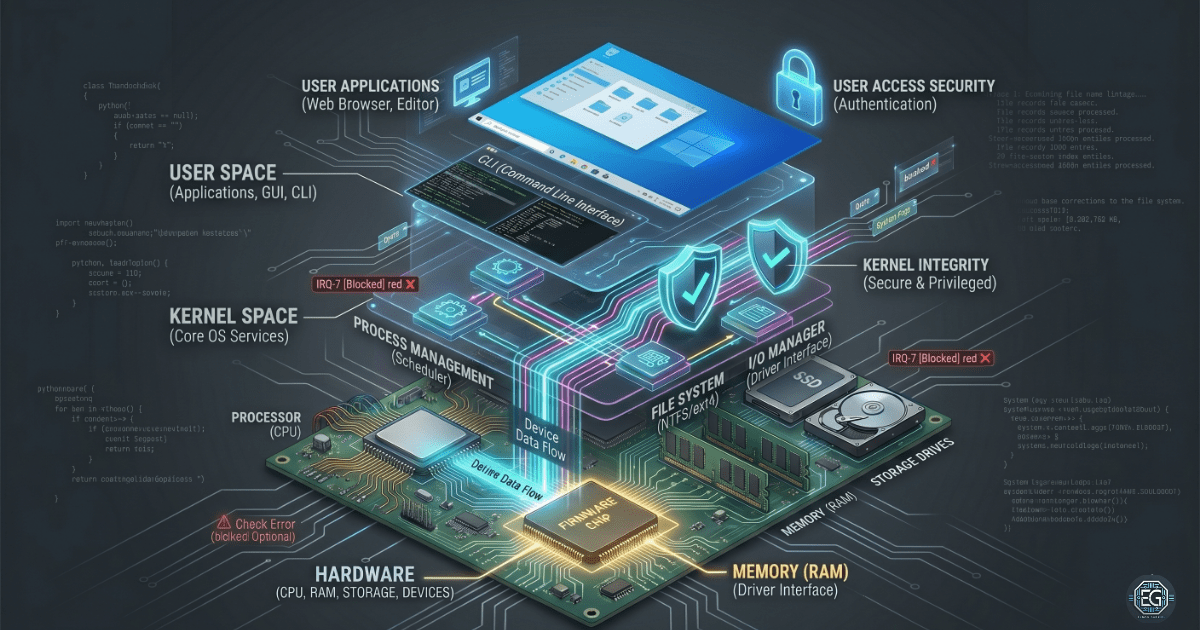
- Kernel: The core of the OS. It controls the memory, CPU usage, and hardware drivers.
- User Space: The area where applications are executed. It is separated from the kernel to prevent the occurrence of system crashes.
Resource Management:
- Process Management: Reviewed how the OS runs multiple programs by sharing the CPU time.
- Memory and Virtual Memory: Studied how the OS uses disk space to support RAM when the memory is limited.
Data and Storage:
- File Systems: Examined how files are stored and organized using systems such as NTFS and EXT4.
- I/O Management: Reviewed how the OS communicates with hardware devices using drivers.
Monitoring and Interaction:
- System Logs: Checked how logs record system, application, and security events are recorded.
- CLI and Shell: Command-line tools are important for system control and troubleshooting.
Root Cause: Many system issues and security problems arise from poor resource management or weak file permissions. This was addressed by creating a clear baseline for the system setup and monitoring.
1.3 Resolution and Validation
The system was reviewed to confirm that all the main OS components were functioning correctly and securely.
| Parameter | Configuration Value |
|---|---|
| Kernel Mode | Protected / Administrative |
| Memory Strategy | Virtual Memory / Paging Active |
| Access Control | Strict Permissions Enforced |
| Scope | OS Stability and Security |
Validation Steps
- Kernel Check: Confirmed that drivers and core services started without errors.
- Process Check: Verified that CPU and memory were used correctly across running programs.
- Log Check: Confirmed that system events were recorded correctly for monitoring and auditing.
2.0: CONCLUSION
2.1 Key Takeaways
- The operating system connects the hardware and software. If it fails, everything above it will fail.
- The separation between the kernel and user space helps protect the system.
- Virtual memory allows systems to run multiple programs, even with limited RAM.
- Understanding boot processes and logs is key to troubleshooting and incident response.
2.2 Security Implications and Recommendations
Risk: Privilege Escalation
Attackers can exploit the kernel or drivers to gain complete system control.
Mitigation: Keep the OS and drivers updated. Enable Secure Boot.
Risk: Weak File Permissions
Incorrect permissions can allow unauthorized access to sensitive data.
Mitigation: Apply least privilege and review permissions regularly.
Best Practices
- Monitor system logs to detect issues early on.
- Use trusted installation and recovery media to avoid malware.
- Regularly check system performance to identify unusual activities.
- Document system changes for tracking and auditing purposes.
Framework Alignment
- Aligns with NIST Cybersecurity Framework: Protect (PR) and Detect (DE)
- Supports CIS Controls for data protection and system management
- Follows general system hardening and administrative best practices