
0.0 Executive Summary
This report explains how core computer hardware works together to support a stable and reliable system design. The goal was to understand how the motherboard, power supply unit (PSU), and connectors operate so that the systems can run safely and without failure. This report also reviews the power standards and common connection types used in modern IT environments.
The result is a clear understanding of how the hardware components interact. This helps prevent system damage, reduces downtime, and improves overall reliability.
1.0 Computer Hardware and Power Infrastructure
1.1 Project Description
The goal of this task was to study how hardware systems work together and how to prevent common hardware failures from occurring.
The focus was on the physical layer of IT systems to:
- Understand System Design: Reviewed how the motherboard connects and manages communication between the hardware components.
- Improve Power Safety: Identified the importance of correct PSU voltage settings (115V vs 230V) and surge protection.
- Check Connections: Documented common connectors, such as USB, network cables, and internal storage interfaces.
This ensures that the systems use the correct hardware, receive stable power, and maintain proper connections.
1.2 Technical Task / Troubleshooting Process
This process focused on understanding how the hardware communicates and receives power.
Key Actions & Observations
Motherboard and Communication:
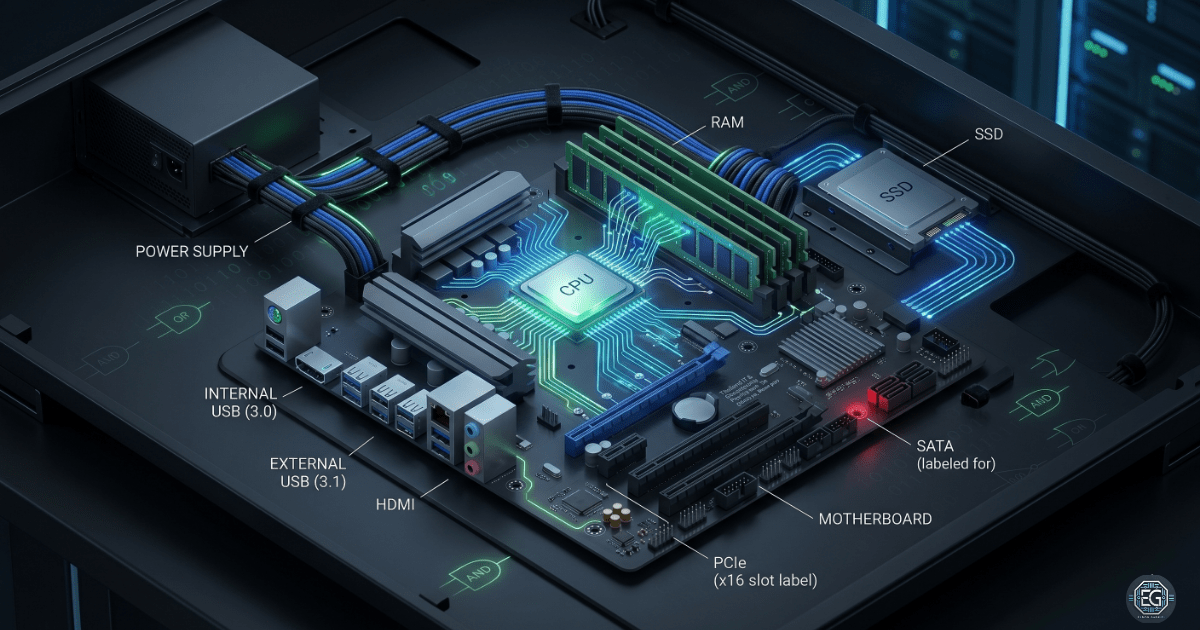
- Identified the motherboard as the central component connecting the CPU, RAM, and storage.
- Reviewed how motherboard size (ATX, Micro-ATX) affects system upgrades and repairs.
Power Supply and Voltage:
- Studied how the PSU converts AC power from the wall into DC power for the system.
- Voltage Check: Confirmed the importance of matching the PSU voltage to local standards to avoid damage.
Connector Types:
- Peripherals: Reviewed USB types and other common connectors used for devices.
- Networking: Identified RJ45 and other connectors used for network communications.
- Internal Connections: Checked the SATA and other connectors used for storage devices.
Root Cause: Many hardware problems are caused by incorrect power settings or using the wrong cables and connectors. These issues can lead to system instability and hardware damage.
1.3 Resolution and Validation
The system was checked to confirm that all the hardware components were safe, compatible, and properly connected.
| Parameter | Configuration Value |
|---|---|
| System Control | BIOS/UEFI |
| Power Safety | Correct Voltage + Surge Protection |
| Connections | Verified and Secure |
| Scope | Physical Hardware Layer |
Validation Steps
- Power Check: Confirmed the PSU provides safe and stable power to all components.
- Compatibility Check: Verified all cables and connectors (USB, SATA, Ethernet) are correct and properly connected.
- Physical Inspection: Checked for loose cables, damaged ports, or bent pins.
2.0: CONCLUSION
2.1 Key Takeaways
- The motherboard connects all the hardware and allows the system to function properly.
- A Correct PSU setup is critical for preventing system damage.
- Checking cables and connectors helps to avoid common hardware issues.
- The System design must balance performance, size, and upgrade capability.
2.2 Security Implications & Recommendations
Risk: Hardware Damage from Power Issues
Incorrect voltage or lack of surge protection can damage the system components.
Mitigation: Use reliable power supplies and always apply surge protection.
Risk: Unauthorized Device Access
Uncontrolled USB and network ports can allow data theft or malware attacks.
Mitigation: Restrict access to ports and control which devices can be connected.
Best Practices
- Limit physical access to hardware to authorized personnel.
- Maintain an updated list of hardware and power requirements.
- Recheck all connections after hardware upgrades.
- Documented system configurations for consistency and compliance.
Framework Alignment
- Supports NIST Cybersecurity Framework (Protect & Detect) by securing physical systems.
- Aligns with ISO 27001 Physical Security controls.
- Follows standard IT practices for system reliability and maintenance.