
0.0 Executive Summary
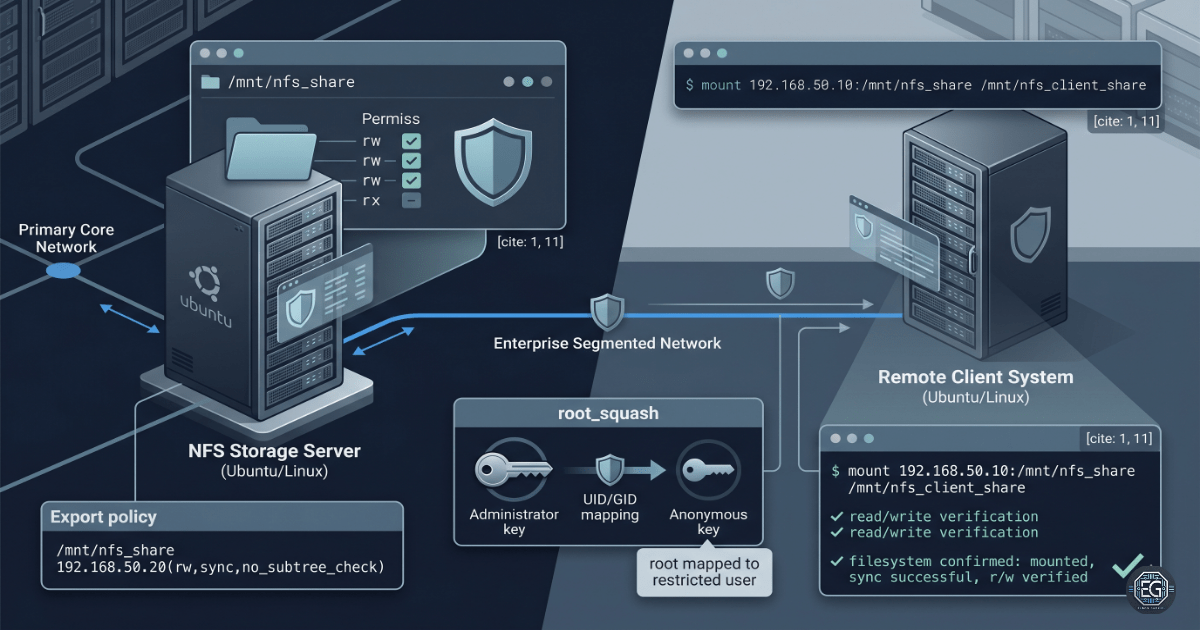
This report documents the setup and testing of a Network File System (NFS) share between two Linux systems. The goal was to create a persistent network share that allows controlled file access between a server and client system.
The configuration included setting access rules through /etc/exports, creating persistent mounts with /etc/fstab, and validating identity protection using the default root_squash security feature.
Testing confirmed that the client system could successfully read and write files to the shared directory while still preventing remote root-level control over the server. This project demonstrates a repeatable method for deploying and validating secure network-based storage in a Linux environment.
1.0 Network File System (NFS) Deployment
1.1 Project Description
The goal of this task was to build hands-on experience with Linux network storage systems by configuring an isolated NFS file share between two hosts.
This implementation demonstrates the following:
- NFS Deployment: Install and configure NFS server and client services.
- Identity Protection: Use
root_squashto limit remote root privileges. - Persistent Mounts: Configure automatic mounts using
/etc/fstab. - Access Restrictions: Limit share access to approved client IP addresses.
1.2 Technical Execution
1.2.1 Environment and Initial Configuration
The configuration was completed inside an isolated subnet.
- Storage Server:
192.168.50.10- Shared Directory:
/mnt/nfs_share
- Shared Directory:
- Remote Client:
192.168.50.20- Mount Point:
/mnt/nfs_client_share
- Mount Point:
Host-based access rules were added to /etc/exports to restrict share access to the approved client system.
The required mount directories were created on both systems.
Temporary permissions were applied using:
sudo chmod 777 /mnt/nfs_share
This allowed the client system to write files through the anonymous account mapped by root_squash.
The live export rules were applied using:
sudo exportfs -a
The client service configuration was refreshed using:
sudo systemctl daemon-reload
Note: Broad write permissions were used only for testing identity mappings. Production systems should enforce least privilege and ownership-based access controls.
# Example NFS export rule
/mnt/nfs_share 192.168.50.20(rw,sync,no_subtree_check)

# Persistent client mount entry
192.168.50.10:/mnt/nfs_share /mnt/nfs_client_share nfs defaults 0 0
Key Insight
The NFS depends on both export rules and filesystem permissions. The default root_squash feature maps remote root actions to nobody:nogroup, so incorrect server permissions can block client write-access.
1.3 Validation and Testing
Several tests were performed to confirm correct operation and security behavior.
- Service Verification: Used
exportfs -vto confirm active export settings. - Mount Verification: Used
mount -ato validate/etc/fstabbefore reboot testing. - Write Verification: Created test data from the client system.
- Identity Verification: Used
ls -lto confirmnobody:nogroupownership mappings.
1.4 Troubleshooting Highlights
-
Permission Errors: Initial client write attempts returned
"Permission denied"errors. Investigation confirmed thatroot_squashwas functioning correctly. The issue was resolved by adjusting server-side permissions for the anonymous account context. -
Boot Validation: The
/etc/fstabconfiguration was tested withmount -abefore rebooting to prevent mount-related startup failures.
Tool Mapping
| Function | Tool / Path | Purpose |
|---|---|---|
| Export Rules | /etc/exports |
Defines approved client access |
| Apply Export Rules | sudo exportfs -a |
Reloads export configuration |
| Persistent Mounts | /etc/fstab |
Stores boot-persistent mounts |
| Service Refresh | sudo systemctl daemon-reload |
Reloads service configuration |
| Mount Validation | mount -a / df -h |
Verifies active mounts |
2.0 CONCLUSION
2.1 Key Takeaways
- NFS requires both export rules and filesystem permissions to work correctly.
root_squashhelps prevent remote administrative access.- Testing mount configurations reduces reboot-related failures.
- Options like
syncandno_subtree_checkimprove consistency and performance.
2.2 Security Implications and Recommendations
Risk: Unauthorized Access Through Over-Permissive Exports
Large subnet ranges or disabled identity protections can allow unauthorized systems to access shared storage.
Mitigation
- Restrict exports to approved IP addresses only.
- Avoid using
no_root_squashin production environments.
Risk: Data Exposure in Transit
Standard NFS traffic is not encrypted and may be intercepted on untrusted networks.
Mitigation
- Isolate storage traffic within secured network segments.
- Use Kerberos authentication (
sec=krb5) for sensitive environments.
Best Practices
- Test
/etc/fstabentries usingmount -abefore rebooting. - Separate shared storage from privileged accounts.
- Review logs regularly for unusual access activity.
Framework Alignment
- NIST CSF (PR.DS-1): Protecting data at rest and in transit.
- CIS Control 3: Data protection and access control.
- ISO 27001 Annex A: Security controls for storage and network access.