
0.0 Executive Summary
This report documents a Linux network routing change that restricted communication with a designated host while maintaining external connectivity.
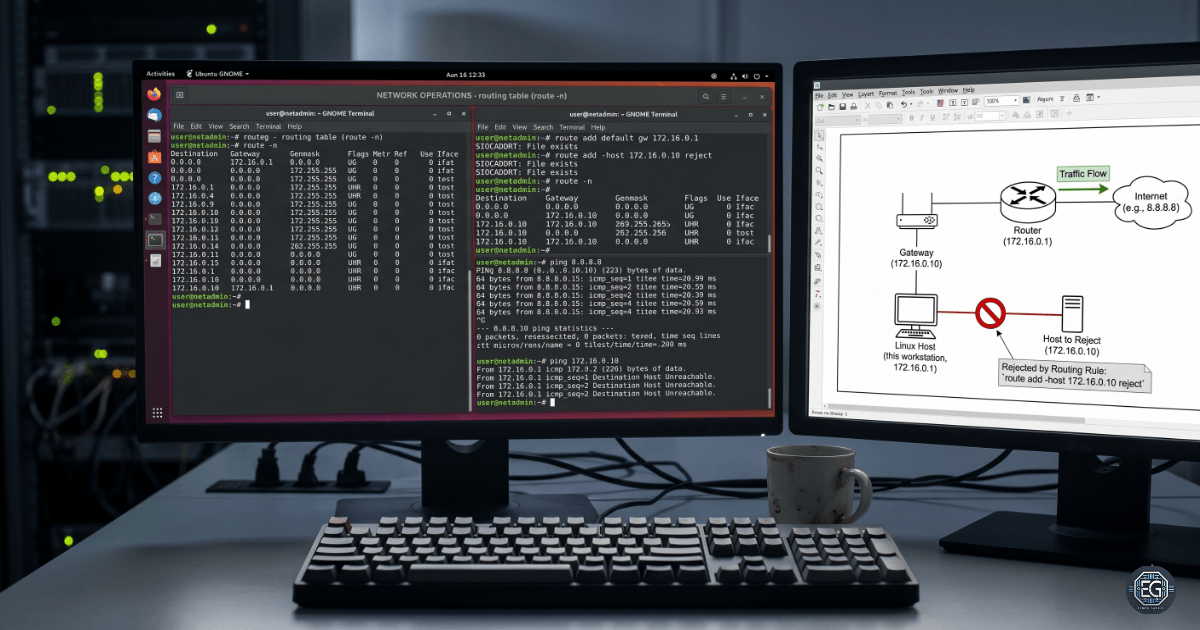
The system operated within the 172.16.0.0/24 network. The routing table was reviewed, a default gateway was configured, and a host-specific reject route was added.
Testing confirmed that traffic to the designated host was rejected at the local routing layer while external connectivity remained available through the default gateway.
The routing change provides an additional host-level traffic control that can complement firewall and network segmentation controls.
Outcome
| Area | Result |
|---|---|
| Routing table | Successfully modified |
| Target host | Traffic rejected |
| External connectivity | Maintained |
| Default gateway | Configured |
| Persistence | Temporary |
| Security impact | Additional host-level traffic restriction |
1.0 Technical Implementation
1.1 Environment
| Component | Details |
|---|---|
| Operating System | Linux |
| Network | 172.16.0.0/24 |
| Target Host | 172.16.0.10 |
| Default Gateway | 172.16.0.1 |
| Routing Tool | route |
| Modern Equivalent | ip route |
1.2 Routing Configuration
Auditing the Routing Table
Reviewed he existing routing table with:
route -n
The numerical output provided the current network paths without performing DNS lookups.
Reviewed the table for the default gateway, local network routes, and host-specific routing entries.
Configuring the Default Gateway
sudo route add default gw 172.16.0.1
This configured 172.16.0.1 as the default gateway for traffic outside the local network.
Restricting the Target Host
sudo route add -host 172.16.0.10 reject
This created a host-specific reject route for 172.16.0.10.
The route prevents traffic from reaching the destination and returns an ICMP unreachable response.
Configuration Note
The route changes created during this exercise remain in the active kernel routing table until removal or the system restarts.
Configure persistent routes through the operating system’s network management system, such as Netplan or NetworkManager.
1.3 Validation and Testing
A structured validation process confirmed both the routing restriction and continued external connectivity.
Routing Table Validation
route -n
The routing table confirmed the presence of:
- The default gateway route.
- The host-specific reject route.
- The expected local network route.
Target Host Validation
ping -c 4 172.16.0.10
The system returned an ICMP destination unreachable response.
This confirmed that the host-specific routing rule prevented normal communication with the target.
External Connectivity Validation
ping -c 4 8.8.8.8
Successful replies confirmed that external traffic continued to use the configured default gateway.
Validation Result
PASS
The routing restriction operated as intended while external connectivity remained available.
1.4 Troubleshooting Highlights
Observation
The routing table required review before and after each configuration change.
Analysis
Incorrect routing entries can prevent legitimate network communication or send traffic through an incorrect gateway.
Action
Reviewed the routing table after configuration changes, followed by connectivity tests against both the restricted host and an external destination.
Validation
Testing confirmed that:
- The system rejected traffic to the designated host.
- External connectivity remained available.
- The expected routing entries appeared in the kernel routing table.
2.0 Security Assessment
2.1 Security Finding
The system used a host-specific routing rule to restrict communication with a designated network host.
This provides a lightweight host-level network control that can help limit unwanted communication.
2.2 Security Implications and Recommendations
Risk: Unauthorized Lateral Movement
An attacker with access to a Linux system may attempt to communicate with other systems after gaining an initial foothold.
Recommendation:
- Use host-level routing restrictions where appropriate.
- Apply firewall rules for broader traffic control.
- Use network segmentation to isolate sensitive systems.
- Review routing changes through formal change control.
Risk: Connectivity Disruption
Incorrect routes can block legitimate traffic or create unexpected network paths.
Recommendation:
- Review the routing table before making changes.
- Validate connectivity after each change.
- Document the original and modified routing configuration.
- Test critical network services after routing changes.
Control Limitation
A reject route provides a host-level restriction. It does not replace firewall controls, network segmentation, or access control policies.
2.3 Modern Administration
The exercise used the legacy route utility for compatibility with the original task.
Modern Linux systems generally use the iproute2 utilities.
| Function | Exercise Tool | Modern Tool |
|---|---|---|
| View routes | route -n |
ip route show |
| Add route | route add |
ip route add |
| Test connectivity | ping |
ping |
For production environments, administrators should use the network management tools supported by the Linux distribution and environment.
3.0 Conclusion
3.1 Key Takeaways
Modified the Linux routing table to restrict communication with a designated host while maintaining external connectivity.
The validation process confirmed that the reject route operated at the local routing layer and that the default gateway continued to provide external network access.
The exercise also demonstrated the importance of validating routing changes before applying them to production systems.
3.2 Recommendations
For production environments:
- Use
iproute2for modern Linux routing management. - Use firewall rules for broader traffic enforcement.
- Use network segmentation for sensitive systems.
- Document routing changes before and after implementation.
- Test critical connectivity after network changes.
- Configure persistent routes only when required by the system design.
3.3 Framework Alignment
The configuration supports established security practices related to network traffic control and infrastructure management.
- NIST CSF: Network and access control practices.
- CIS Controls: Network infrastructure management.
- ISO/IEC 27001: Network security and network service protection.