
0.0 Executive Summary
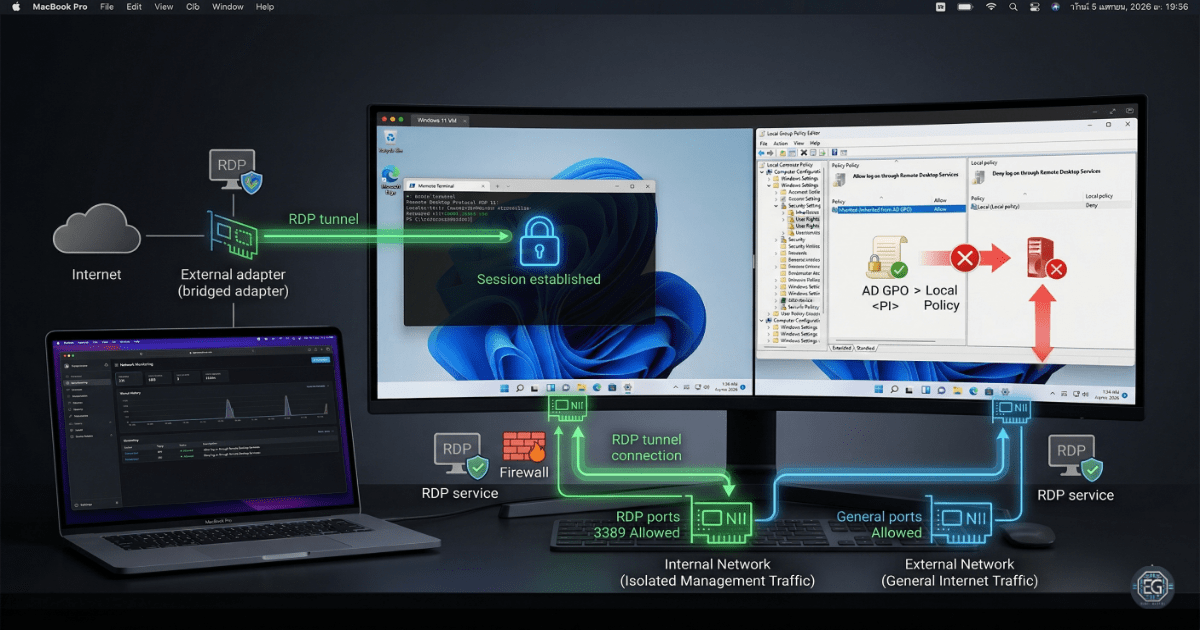
This report documents the troubleshooting and configuration of secure remote access and network isolation between a macOS host and a Windows 11 virtual machine.
The objective was to reduce the risk of unauthorized access and network exposure by resolving Group Policy (GPO) conflicts and implementing a dual-homed network architecture.
The final result is a stable and controlled remote management setup. Remote Desktop connectivity was restored, internet access remained available, and management traffic was kept isolated through properly configured network interfaces.
1.0 Troubleshooting Remote Access and Network Isolation
1.1 Project Description
The goal of this task was to configure a reliable Remote Desktop Protocol (RDP) environment for managing an isolated virtual machine from a host system.
A phased troubleshooting approach was used to:
- Stabilize network connectivity using a dual-adapter (dual-homed) configuration
- Identify and resolve Group Policy conflicts affecting remote login access
- Document system-level changes, including registry settings and user rights assignments
This ensures that authorized administrative access is maintained while keeping the VM isolated from unnecessary exposure.
1.2 Technical Task / Troubleshooting Process
The process focused on identifying configuration issues and applying policy-based fixes to restore connectivity.
Key Actions & Observations
-
Identified a Group Policy conflict where the “Deny log on through Remote Desktop Services” setting blocked valid administrative access.
-
Configured User Rights Assignment using Local Group Policy Editor (
gpedit.msc). -
Verified and adjusted registry settings to ensure Remote Desktop Services were functioning correctly.
-
Ensured administrators were included in the appropriate “Allow” permissions while preserving deny rules for unauthorized accounts.
- Implemented a dual-homed network design:
- Internal adapter for isolated management traffic
- Bridged adapter for external internet connectivity
-
Verified Remote Desktop Services were running and that firewall rules allowed RDP traffic.
-
Confirmed both network adapters were functioning as expected.
- Documented all configuration steps for repeatability in future deployments.
Root Cause: A Group Policy “Deny” rule took precedence over “Allow” permissions, preventing legitimate remote logins. This was resolved by correcting user rights assignments and ensuring proper policy hierarchy.
1.3 Resolution and Validation
The system was validated after applying the corrected configurations.
| Parameter | Configuration Value |
|---|---|
| Management Tool | Group Policy / Registry Editor |
| Control State | Enforced / Active |
| Security Mode | Isolated Management (RDP) |
| Scope | macOS Host to Windows VM Connectivity |
Validation Steps
-
Attempted an RDP connection from the macOS host after remediation.
-
Verified successful authentication and session establishment.
-
Confirmed the VM maintained internet connectivity through the bridged adapter while remaining isolated for management traffic.
2.0: CONCLUSION
2.1 Key Takeaways
- Misconfigured Group Policy settings can block legitimate administrative access if “Deny” rules are not properly controlled.
- Dual-homed network configurations allow separation of management and external traffic.
- Validation testing is necessary to confirm both access and isolation function correctly.
- Proper configuration ensures secure access without disrupting usability.
2.2 Security Implications & Recommendations
Risk: Group Policy Conflicts
Conflicting policies can override intended access controls and block authorized users.
Mitigation: Regularly review Group Policy using tools such as RSoP to detect and resolve conflicts.
Risk: Unsecured Remote Access
Improperly configured RDP services can be exposed to brute-force attacks or unauthorized access.
Mitigation: Restrict access using network isolation, enforce strong authentication, and limit RDP access to trusted systems.
Best Practices
- Apply least privilege by limiting Remote Desktop access to approved administrative accounts
- Maintain centralized documentation of configuration changes for consistency
- Revalidate system settings after updates or policy changes
- Monitor and audit access logs to detect unusual activity
Framework Alignment
- Aligns with NIST CSF (PR.AC and PR.IP) for access control and secure configuration management
- Supports ISO 27001 requirements for secure system administration and remote access
- Reinforces the Protect function of the NIST CSF through identity and configuration controls