
0.0 Executive Summary
This report documents the investigation and technical analysis of a filesystem corruption incident involving an external USB device. The objective was to identify the root cause of an “unreadable” device state following its use in a virtualized environment. The investigation focused on determining if the failure was a result of permanent hardware damage or a logical filesystem error caused by improper removal.
The result was the confirmation of logical filesystem corruption rather than hardware failure. By utilizing structured troubleshooting—including port switching and disk utility analysis—the system state was stabilized, preventing unnecessary hardware replacement and validating that safe removal procedures are critical for data availability.
1.0 USB Filesystem Corruption Analysis
1.1 Project Description
The goal of this task was to diagnose the failure of an external storage device and restore operational clarity regarding the state of the media.
The implementation used a structured troubleshooting approach to:
-
Establish a baseline for hardware functionality by isolating the interface (USB port) from the media.
-
Validate filesystem integrity by attempting to run repair utilities and observing error output.
-
Improve accountability and visibility of system changes by documenting the specific errors generated when a device is disconnected during active write operations.
This ensures that administrative procedures for handling external media are grounded in technical evidence of how data loss occurs.
1.2 Technical Task / Troubleshooting Process
The process focused on identifying the specific failure point after a USB device became unreadable following a virtual machine session.
Key Actions & Observations
Hardware Isolation: Switched the USB device to a different physical port to confirm that the workstation’s hardware interface was not the cause of the non-responsiveness.
Volume Analysis:
-
Attempted to run
chkdsk E: /fto repair the volume. -
Observed the error: “Cannot open volume for direct access,” indicating the filesystem was either locked by another process or too corrupted for the utility to mount.
State Validation:
-
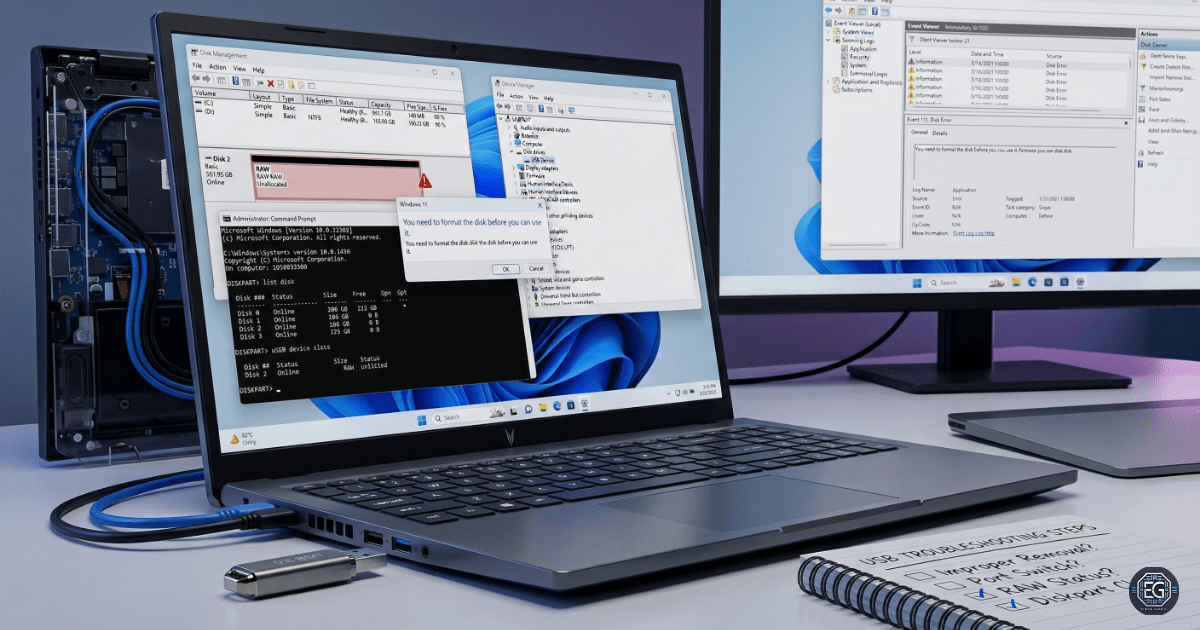
Used Disk Management to confirm the device was recognized at the hardware level but listed as “RAW” or “Unallocated.”
-
Verified that while the physical disk was functional, the logical structures (such as the MFT) had been damaged due to improper removal during a write-heavy operation.
Root Cause: The device was disconnected while the OS or a virtualized guest held an active handle on the filesystem. This interrupted the write process, leading to the corruption of the filesystem metadata and rendering the data unreadable.
1.3 Resolution and Validation
The investigation concluded with a verified diagnosis of logical corruption, allowing for a targeted recovery or re-provisioning plan.
| Parameter | Configuration Value |
|---|---|
| Management Tool | Disk Management / chkdsk |
| Device State | Hardware Functional / Logical Failure |
| File System State | RAW / Corrupted |
| Scope | External USB Storage |
Validation Steps
-
Hardware Confirmation: Successfully detected the device on multiple USB ports, confirming the physical controller and NAND flash remained operational.
-
Logical Validation: The system prompted to “Format the disk before you can use it,” confirming that the OS could see the hardware but could no longer parse the corrupted filesystem.
-
Contention Check: Verified that closing all virtualization software and background handles did not restore access, proving the corruption was persistent and required a re-format.
2.0: CONCLUSION
2.1 Key Takeaways
-
Operational reliability is directly tied to “Safe Removal” procedures; disconnecting during active read/write cycles is the primary cause of logical data loss.
-
Hardware and logical failures must be isolated through cross-port testing to avoid misdiagnosing healthy equipment as broken.
-
Validation through disk utilities is required to determine if a volume can be repaired or if it must be completely re-provisioned.
-
Structured troubleshooting prevents “ghost” troubleshooting of software when the issue is a damaged filesystem state.
2.2 Security Implications & Recommendations
Risk: Permanent Data Loss Improper removal during active disk repair or large transfers can result in the loss of all information on the volume.
Mitigation: Enforce “Safe Removal” policies and ensure that automated backup routines are in place for data being transferred via removable media.
Risk: Operational Disruption Corrupted media can stall critical workflows and lead to delays in data-intensive research or administrative tasks.
Mitigation: Avoid running intensive disk utilities (chkdsk, defrag) on unstable or intermittently connected hardware.
Best Practices
-
Always use the “Eject” or “Safely Remove Hardware” feature before physically disconnecting a device.
-
Enforce exclusive access to USB devices when running repair tools to prevent “Direct Access” errors.
-
Use Disk Management or
diskpartto confirm the health and partition state of any device that behaves unexpectedly. -
Align these findings with the NIST CSF PR.DS-4 (Capacity and Availability) to ensure that storage assets are managed to prevent unforced downtime.
Framework Alignment
-
Aligns with NIST principles for maintaining information integrity and system availability.
-
Supports general IT operations standards for hardware lifecycle management and data protection.