
0.0 Executive Summary
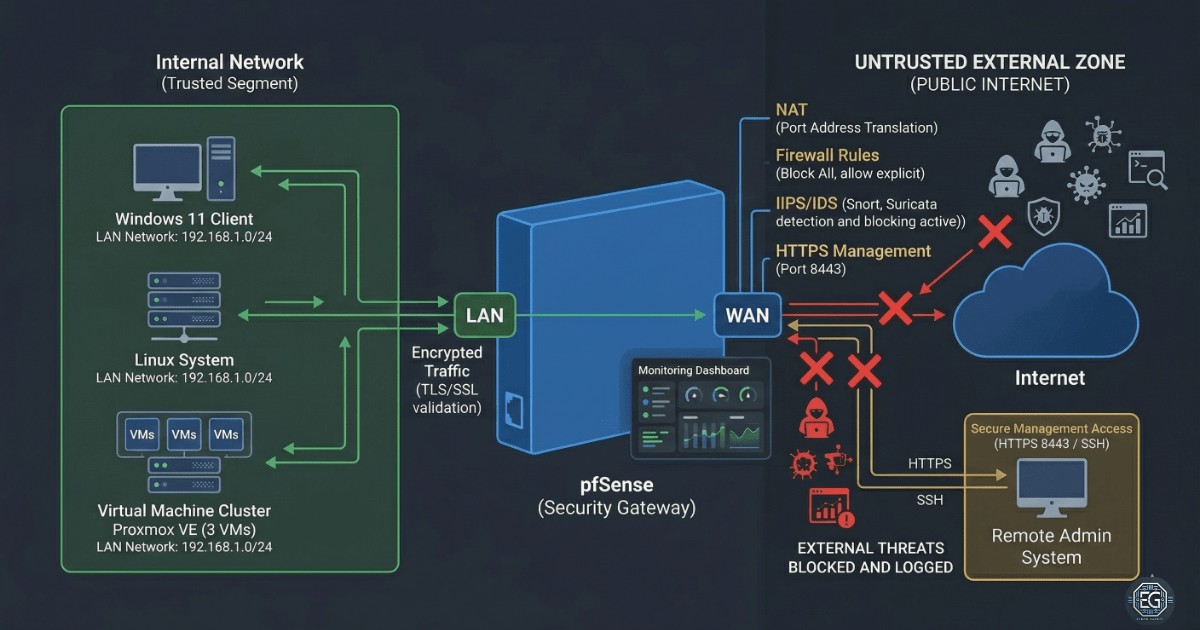
This report explains how a secure network gateway was built and hardened using pfSense in a virtual lab environment.
The goal was to reduce the risk of unauthorized access and prevent systems from communicating in unsafe ways. This was done by applying strong access controls, limiting management access, and separating internal systems from the internet.
The final result is a stable and secure network setup. Internal systems are isolated, and administrative access is restricted and monitored. This provides a safe foundation for future testing, learning, and system deployment.
1.0 pfSense Infrastructure Framework
1.1 Project Description
The goal of this task was to build a secure network perimeter using pfSense to control traffic between internal systems and the internet.
The system was designed to:
-
Enforce secure behavior by moving the management interface to a non-standard port (HTTPS 8443) and enabling encrypted access
-
Restrict unauthorized access by placing all lab systems on a single isolated internal network
-
Improve visibility by enabling monitoring tools for system performance and firewall activity
This setup ensures that internal systems are protected behind a controlled firewall and are not directly exposed to external networks.
1.2 Technical Task / Troubleshooting Process
The process focused on fixing network issues and applying security controls to stabilize the environment.
Key Actions & Observations
Network Stabilization
- Identified a connection issue caused by incorrect virtual network settings
- Fixed the issue by placing all systems on a single internal network
- Reconfigured pfSense interfaces to match the correct network setup
Secure Management Access
- Changed the WebGUI to use HTTPS on port 8443
- Enabled SSH access for secure command-line management
- Ensured only trusted systems could access the firewall
Firewall Configuration
- Allowed internal systems to access the internet through NAT
- Blocked all incoming traffic unless explicitly allowed
- Verified rules using logs and dashboard monitoring
System Validation
- Used tools like
ping,netstat, andsockstatto confirm services were running correctly - Confirmed that all interfaces were active and processing traffic
Root Cause
The main issue was caused by inconsistent virtual network settings. This created an IP mismatch that blocked access to the firewall interface.
This was fixed by using a single internal network and correctly assigning interfaces.
1.3 Resolution and Validation
The system was secured and tested to confirm correct operation.
| Parameter | Configuration Value |
|---|---|
| Management Tool | pfSense WebGUI / CLI |
| Gateway IP (LAN) | 192.168.10.1 |
| Management Port | HTTPS 8443 |
| Security Mode | Isolated Lab Gateway |
| Scope | Virtual Lab Environment |
Validation Steps
-
Connectivity Test
Verified that internal systems could reach the gateway and access the internet -
Secure Access Test
Confirmed the WebGUI was only accessible over HTTPS on port 8443 -
Interface Verification
Checked that WAN and LAN interfaces were active and handling traffic correctly
2.0: CONCLUSION
2.1 Key Takeaways
- Small network misconfigurations can cause full system access failure
- Using non-standard ports improves security by reducing exposure
- Both GUI and command-line tools are needed for full validation
- A well-structured network improves both security and stability
2.2 Security Implications & Recommendations
Risk: Exposed Management Interface
Default ports increase the risk of unauthorized access.
Mitigation: Use non-standard ports and restrict access to trusted systems only.
Risk: Poor Network Segmentation
Improper network setup can expose internal systems to external threats.
Mitigation: Use a dedicated internal network and verify all connections.
Best Practices
- Use separate user accounts for firewall management
- Back up pfSense configurations after changes
- Re-check network settings after system updates
- Keep clear documentation of IP addresses and firewall rules
Framework Alignment
- Supports NIST CSF PR.AC (Access Control) by securing management access
- Supports PR.PT (Protective Technology) through firewall and NAT controls
- Aligns with standard network hardening practices for secure system design