
0.0 Executive Summary
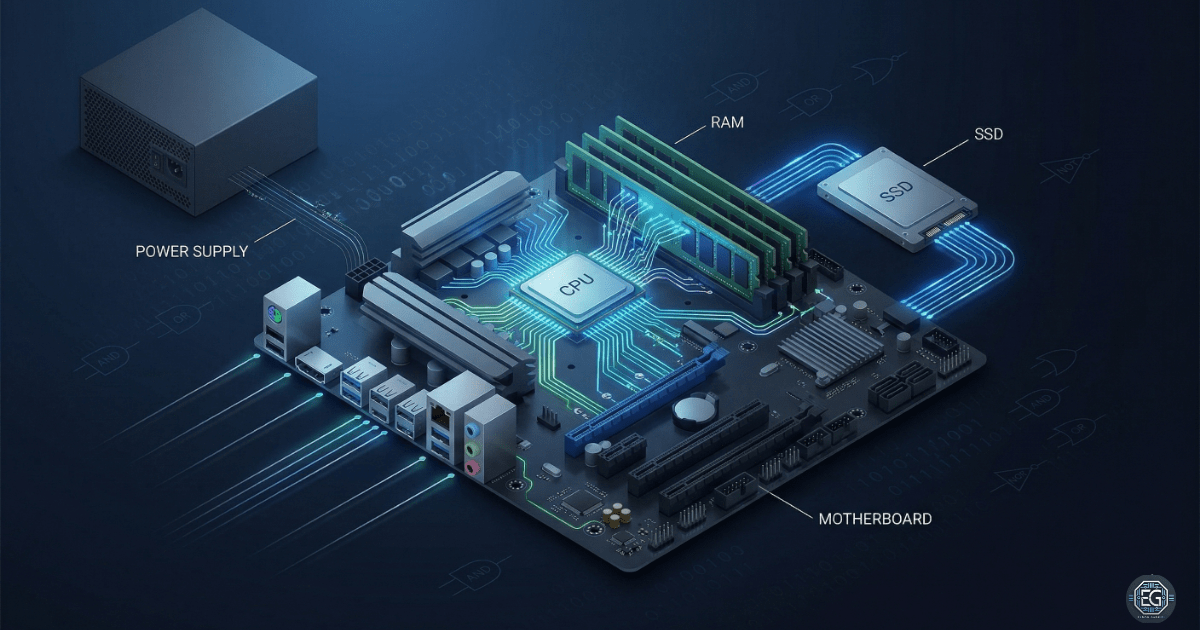
This report explains the basic hardware components of a computer and how they work together to process the data.
The goal was to build a clear understanding of how the systems operate at the physical level (Layer 1). This includes how the CPU processes instructions, how the memory stores data, and how the components communicate through the motherboard.
The result is a structured view of how programs interact with the hardware. This improves the troubleshooting ability and supports better system design and security awareness.
1.0 Computer Hardware Fundamentals
1.1 Project Description
The goal of this task was to understand the hardware components of a computer and how they support system operations.
The implementation focused on identifying each component and its role in data processing.
This included:
- CPU for processing instructions
- RAM for temporary memory
- Storage devices for long-term data
- Motherboard for communication between components
- Power supply for delivering usable electricity
This ensures a clear understanding of how systems function at the foundational level, which is required for troubleshooting and system administration.
1.2 Technical Task / System Analysis
The process focused on breaking down the interactions of hardware components during normal system operation.
Key Components
- CPU (Central Processing Unit):
- Performs calculations and executes program instructions
- Speed measured in GHz (clock cycles per second)
- RAM (Random Access Memory):
- Stores data temporarily while the system is running
- Clears when the system is powered off
- Storage (Hard Drive / Storage State Drive):
- Stores permanent data such as files, applications, and operating systems
- Motherboard:
- Connects all hardware components together
- Allows communication between CPU, RAM, and storage
- Power Supply Unit (PSU):
- Converts electricity from the wall into usable power for the system
- Ports:
- Physical connection points for external devices (USB, HDMI, etc.)
Programs and Processing
- Programs:
- Instructions that tell the computer what to do
- Memory Controller Chip (MCC):
- Acts as a bridge between CPU and RAM
- Controls how data moves between them
- Clock Cycle:
- A unit of time used by the CPU to process instructions
- Example: 3.4 GHz = 3.4 billion cycles per second
CPU Compatibility
- CPUs must match the motherboard socket type:
- LGA (Land Grid Array): Pins on the motherboard
- PGA (Pin Grid Array): Pins on the CPU
An incorrect pairing prevents the system from functioning.
CPU Cache
The CPU cache stores frequently used data to improve speed.
- L1 Cache: Fastest and smallest (used immediately)
- L2 Cache: Medium size and speed
- L3 Cache: Largest and slowest (shared across cores)
A cache reduces the need to access slower RAM.
Overclocking
Overclocking increases the CPU speed beyond the default settings.
- Benefits:
- Faster processing
- Improved performance for heavy tasks
- Risks:
- Overheating
- System instability
- Hardware damage
- Voided warranty
Overclocking should only be performed with proper cooling and system support.
1.3 Resolution and Validation
The understanding was validated by mapping how the data flowed through the system.
| Component | Function |
|---|---|
| CPU | Processes instructions |
| RAM | Temporary data storage |
| Storage | Long-term data storage |
| Motherboard | Connects all components |
| PSU | Supplies power |
Validation Steps
- Identified each hardware component and its function
- Mapped how data moves between CPU, RAM, and storage
- Confirmed CPU speed and cache roles in performance
- Verified compatibility requirements between CPU and motherboard
2.0: CONCLUSION
2.1 Key Takeaways
- All computer operations rely on hardware working together as a system
- The CPU processes instructions using clock cycles and cache memory
- RAM provides fast temporary storage, while drives store permanent data
- The motherboard connects all components and allows communication
- Hardware compatibility is required for proper system operation
2.2 Security Implications & Recommendations
Risk: Hardware Misconfiguration
Incorrect CPU or motherboard compatibility can cause system failures.
Mitigation: Always verify hardware compatibility before installation.
Risk: Overheating from Overclocking
Increasing the CPU speed without proper cooling can damage the hardware.
Mitigation: Use proper cooling systems and avoid unnecessary overclocking.
Best Practices
- Verify compatibility between CPU and motherboard before deployment
- Use monitoring tools to track CPU temperature and performance
- Avoid overclocking unless required and properly supported
- Document system hardware for troubleshooting and maintenance
Framework Alignment
- Supports NIST CSF PR.IP (Information Protection Processes) through proper system configuration
- Aligns with CIS Controls for secure system setup and maintenance
- Reinforces foundational knowledge required for secure infrastructure