
0.0 Executive Summary
This report documents the hardware integrity investigation and terminal failure analysis of a 2TB external USB storage device.
The objective was to determine the root cause of repeated I/O timeouts and “Device Descriptor” errors encountered during cross-platform use (Windows 11 and Kali Linux). The investigation aimed to differentiate between driver-level conflicts in a virtualized environment and permanent degradation of physical hardware.
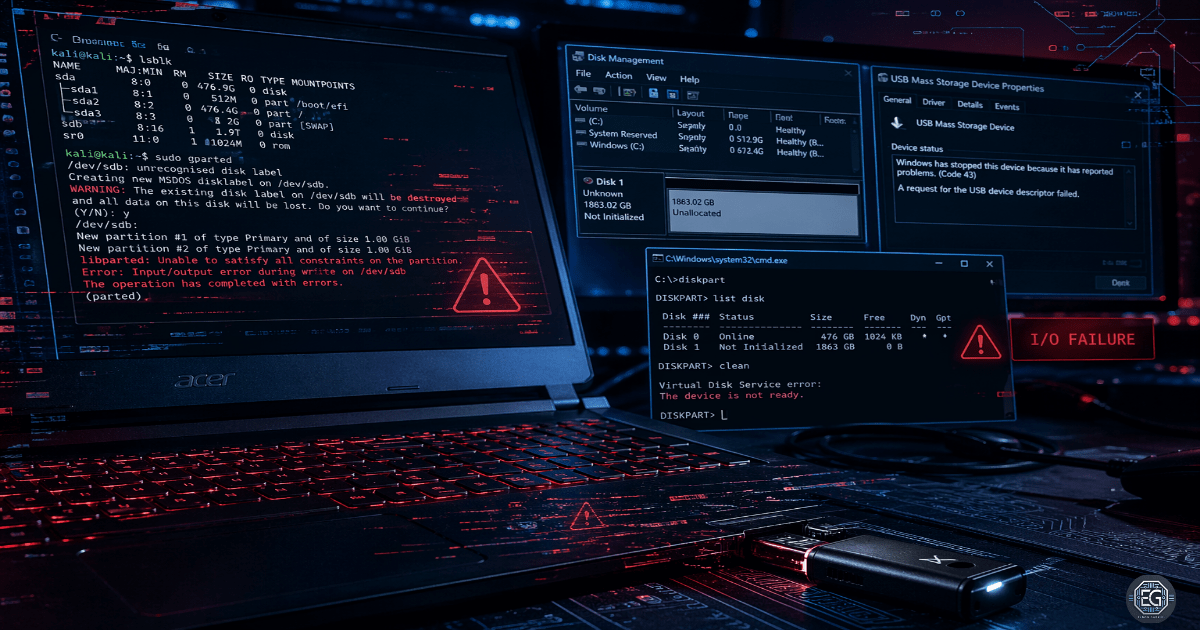
The results confirmed a terminal hardware-level I/O failure. Diagnostic attempts, including MBR partition table writes using gparted and driver stack resets, triggered consistent system-wide I/O locks and controller crashes.
This confirms that the device is no longer suitable for secure administrative use and requires secure disposal or physical destruction to mitigate potential data exposure.
1.0 Hardware Integrity Investigation: 2TB USB Failure
1.1 Project Description
The goal of this task was to perform a definitive diagnosis of a high-capacity storage device to ensure reliability for technical operations.
A multilayered testing approach was used to:
Analyze Technical Architecture: Evaluate communication between the USB flash controller and the OS bus under write load
Isolate Failure Domains: Perform cross-environment testing (Host vs Guest VM) to rule out virtualization issues
Improve Accountability: Document low-level error codes (e.g., Rufus 0xC0030037) for audit and validation
This ensures that the storage media are validated before use in administrative or forensic operations.
1.2 Technical Task / Troubleshooting Process
The process focused on identifying the failure point using low-level disk tools and driver analyses.
Key Actions & Observations
Initial State Assessment
- Device frequently appeared as “unallocated”
- Failed to maintain a stable partition table
- Windows reported “Device Descriptor Request Failed”
Linux-Based Diagnostics (Kali Linux)
- Attempted MBR partition creation using
sudo gparted - Triggered immediate I/O timeouts
- Process entered unkillable “zombie” state due to hardware lock
Driver and Bus Analysis (Windows 11)
- Performed host restart and driver stack reset
- Device briefly detected but failed during write operations
- USB controller crashed and disconnected from OS bus
Post-Failure Behavior
- “Console View Out-of-Date” errors observed
- Confirms device disconnect during active operations
Root Cause:
This behavior is consistent with NAND flash controller failure or firmware-level faults. The controller fails during write operations, causing a physical I/O lock that bypasses the normal software control.
1.3 Resolution and Validation
The device was verified to be non-functional and decommissioned.
| Parameter | Configuration Value |
|---|---|
| Management Tool | gparted / Rufus / Disk Management |
| Device State | Terminal Hardware Failure |
| Error Code | 0xC0030037 (I/O Failure) |
| Scope | External 2TB Storage Media |
Validation Steps
- Reproduced failure across Windows and Linux environments
- Confirmed failure was not OS-specific and occurred at hardware interface level
- Verified device disappearance during write attempts via Disk Management
- Assessed inability to complete data sanitization operations
2.0 CONCLUSION
2.1 Key Takeaways
- Hardware reliability depends on stable communication with the system bus under load
- Hardware failures can appear as software freezes or unresponsive processes
- Cross-platform testing is required to confirm hardware-level issues
- Documenting error codes helps prevent repeated troubleshooting of failed devices
2.2 Security Implications and Recommendations
Risk: Incomplete Data Sanitization
Failed controllers prevent complete data wipes, leaving residual data at risk.
Mitigation: Physically destroy storage media that fails write validation.
Risk: Supply Chain Integrity
Unreliable behavior may indicate counterfeit or low-quality components.
Mitigation: Procure hardware from trusted vendors and validate devices before use.
Best Practices
- Apply zero trust principles to removable media with hardware errors
- Track hardware failures to identify patterns across devices
- Test devices across multiple USB ports and systems
- Maintain evidence records for audit and validation
Framework Alignment
- Aligns with NIST SP 800-53 (SA-12) for supply chain protection
- Supports ISO 27001 (A.11.2.7) for secure device disposal
- Reinforces hardware integrity and availability controls in administrative environments