
0.0 Executive Summary
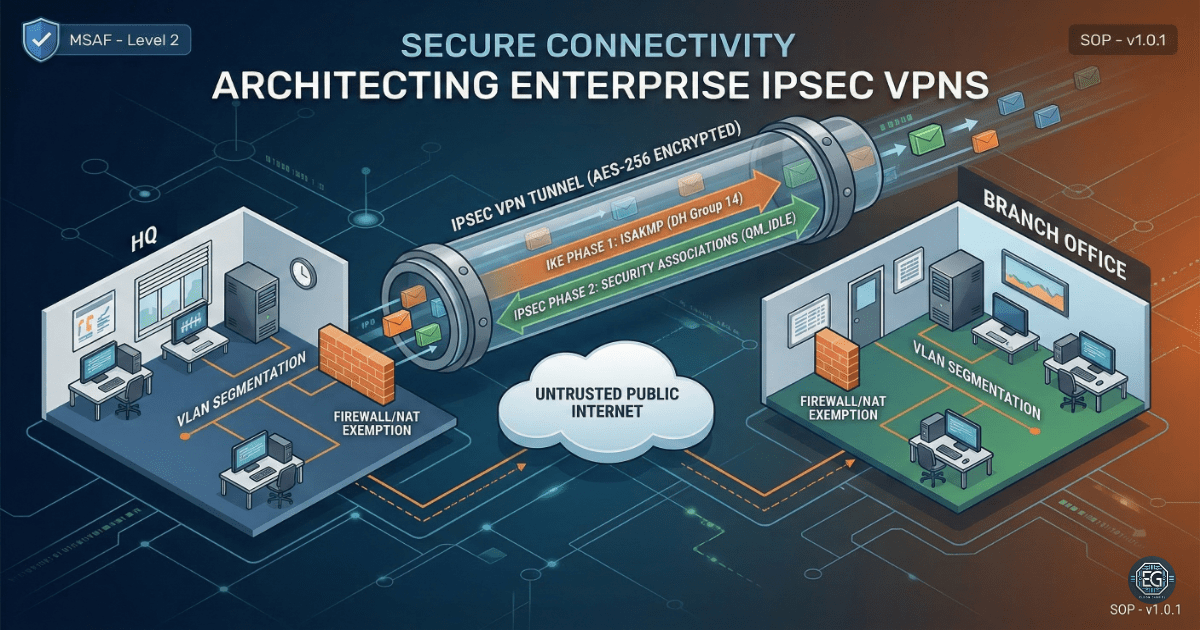
This report explains how a site-to-site IPsec VPN was set up between a Headquarters (HQ) firewall and a Branch Office (BO) firewall.
The goal was to protect data traveling over the internet by using encryption and secure authentication.
The final result improved security by replacing unencrypted traffic with a secure VPN tunnel. This tunnel was tested using traffic checks and VPN status commands.
1.0 Enterprise IPsec VPN Diagnostics
1.1 Project Description
The goal of this task was to build a secure VPN tunnel between two network sites.
This was done using firewall configurations to:
- Create a Phase 1 (ISAKMP/IKE) policy for secure key exchange
- Create a Phase 2 (IPsec) policy for encrypted data transfer
- Control which traffic is allowed into the VPN tunnel
These controls protect data from being read or changed while it travels across public networks.
1.2 Technical Task / Troubleshooting Process
The process focused on fixing insecure default routing and applying secure VPN settings.
Key Actions & Observations
- Reviewed traffic flow and found that data was either dropped or sent without encryption
Configured the following:
- ISAKMP (Phase 1) policies
- IPsec (Phase 2) transform sets (AES-256 / SHA)
Applied security controls by:
- Using Pre-Shared Keys (PSK) for authentication
- Defining “interesting traffic” with ACLs
- Exempting VPN traffic from NAT rules
Verified supporting components:
- ISAKMP Security Associations (SA)
-
IPsec encryption and decryption counters
- Documented all configurations for reuse
Root Cause:
By default, there is no secure tunnel between sites. This allows traffic to travel without encryption or be blocked. The issue was fixed by configuring IPsec policies and secure authentication.
1.3 Resolution and Validation
The VPN tunnel was tested to confirm it was working correctly.
| Parameter | Configuration Value |
|---|---|
| Management Tool | CLI (Firewall / Cisco ASA) |
| Control State | Active |
| Security Mode | AES-256 Encryption / SHA |
| Scope | HQ to Branch VPN |
Validation Steps
-
Ran a traceroute from HQ to the Branch network
- Checked VPN status using:
show crypto isakmp sashow crypto ipsec sa
-
Verified the tunnel was active and packet counters were increasing
-
Confirmed successful communication between both sites
- Tested normal applications across the VPN
2.0 CONCLUSION
2.1 Key Takeaways
- IPsec VPNs protect data across untrusted networks
- Encryption and hashing ensure data confidentiality and integrity
- Proper configuration is required for both Phase 1 and Phase 2
- Validation confirms that traffic is actually encrypted
- Secure setup allows normal communication between sites
2.2 Security Implications and Recommendations
Risk: Data Interception
Unencrypted traffic can be captured during transmission.
Mitigation:
Use IPsec VPNs with strong encryption such as AES-256 and SHA-2.
Risk: Tunnel Failure or Misconfiguration
Incorrect settings can break the VPN or stop traffic.
Mitigation:
Monitor VPN status regularly and check logs using diagnostic commands.
Best Practices
- Limit VPN access to required subnets only
- Rotate Pre-Shared Keys regularly
- Monitor tunnel health and traffic patterns
- Test configurations after any firewall or network change
- Document all VPN settings for recovery and audits
Framework Alignment
- Supports NIST guidance for secure VPNs (SP 800-77)
- Aligns with ISO 27001 for network security
- Supports the NIST Cybersecurity Framework (Protect function) by securing data in transit