
0.0 Executive Summary
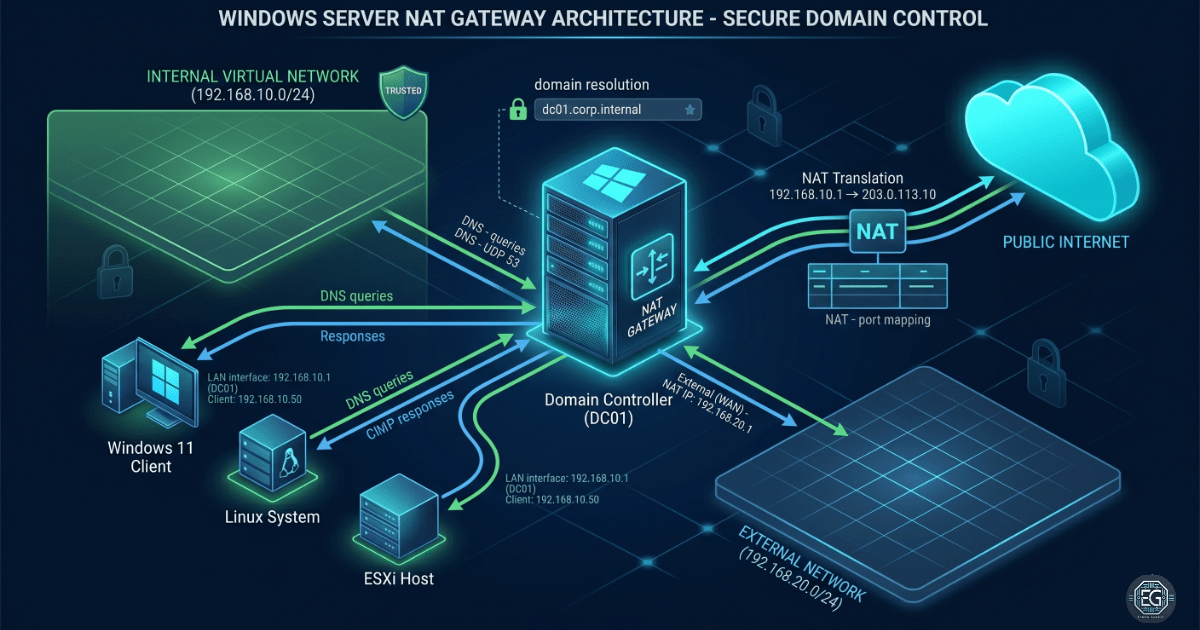
This report explains how a Windows Server 2016 Domain Controller (DC01) was set up to act as a network gateway and DNS server in a lab environment. The goal was to allow internal virtual machines to access the internet through one controlled point. During setup, a duplicate IP issue was found. This caused a network conflict and stopped proper communication.
The issue was fixed by changing the gateway IP address and updating routing settings. After this, the network became stable. Systems were able to reach the internet, and DNS worked correctly across the lab.
1.0 Domain Controller Network Configuration
1.1 Project Description
The goal of this task was to configure DC01 as a gateway between the internal lab network and the external network.
This setup used two network adapters:
- Internal Network:
192.168.10.2 - External Network:
192.168.20.10
The Domain Controller was also configured as the main DNS server for the corp.internal domain.
This setup ensures that all devices inside the lab use one trusted system for both internet access and name resolution.
1.2 Technical Task / Troubleshooting Process
The main issue was a duplicate IP conflict on the internal network.
Key Actions
- IP Conflict Identification
- The IP address
192.168.10.1was already in use by the VMware virtual adapter. - This caused a duplicate IP warning and broke network communication.
- The IP address
- Fix Applied
- The gateway was changed to
192.168.10.2. - This removed the conflict and restored connectivity.
- The gateway was changed to
- Routing Configuration
- NAT was enabled using Routing and Remote Access (RRAS).
- This allowed internal systems to access the internet through DC01.
- ESXi Integration
- The ESXi host routing table was updated using
esxcli. - The default gateway was changed to the new DC01 IP.
- The ESXi host routing table was updated using
- Recovery Process
- A simple PowerShell method was created to reset NAT if needed.
Root Cause
The issue was caused by an IP conflict. The VMware host adapter was already using 192.168.10.1, which caused an ARP conflict when the same IP was used as the gateway.
1.3 Resolution and Validation
After fixing the IP conflict and updating routing, the network was tested to confirm it was working correctly.
Configuration Summary
| Parameter | Value |
|---|---|
| Gateway (DC01) | 192.168.10.2 |
| DNS Domain | corp.internal |
| Tools Used | RRAS, PowerShell, esxcli |
Validation Steps
- Ran
vmkping 8.8.8.8from ESXi to confirm internet access. - Checked
ipconfigand ARP table to confirm no duplicate IP. - Verified that a client system could access the internet and resolve DNS.
2.0 CONCLUSION
2.1 Key Takeaways
- IP conflicts can break network communication and must be resolved quickly.
- A single gateway simplifies network routing and control.
- Both connectivity and DNS must be tested to confirm a working network.
- A clear IP plan helps prevent conflicts in virtual environments.
2.2 Security Implications and Recommendations
Risk: Network Outage
An IP conflict on the gateway can stop all network traffic.
Recommendation: Reserve important IP addresses and avoid using default ranges like .1.
Risk: Single Point of Failure
Using one Domain Controller as a gateway means failure can affect the whole network.
Recommendation: Plan for backup systems or redundancy in larger environments.
Risk: Weak Network Control
Without proper NAT setup, internal traffic may not be controlled.
Recommendation: Use RRAS rules and monitor network traffic.
Best Practices
- Limit access to Domain Controller management tools.
- Ensure all systems use the correct DNS server.
- Re-check settings after system or hypervisor updates.
- Keep documentation for quick recovery if issues happen.
Framework Alignment
- NIST PR.AC: Controls access through managed network routing.
- NIST PR.PT: Uses NAT and routing to protect internal systems.