
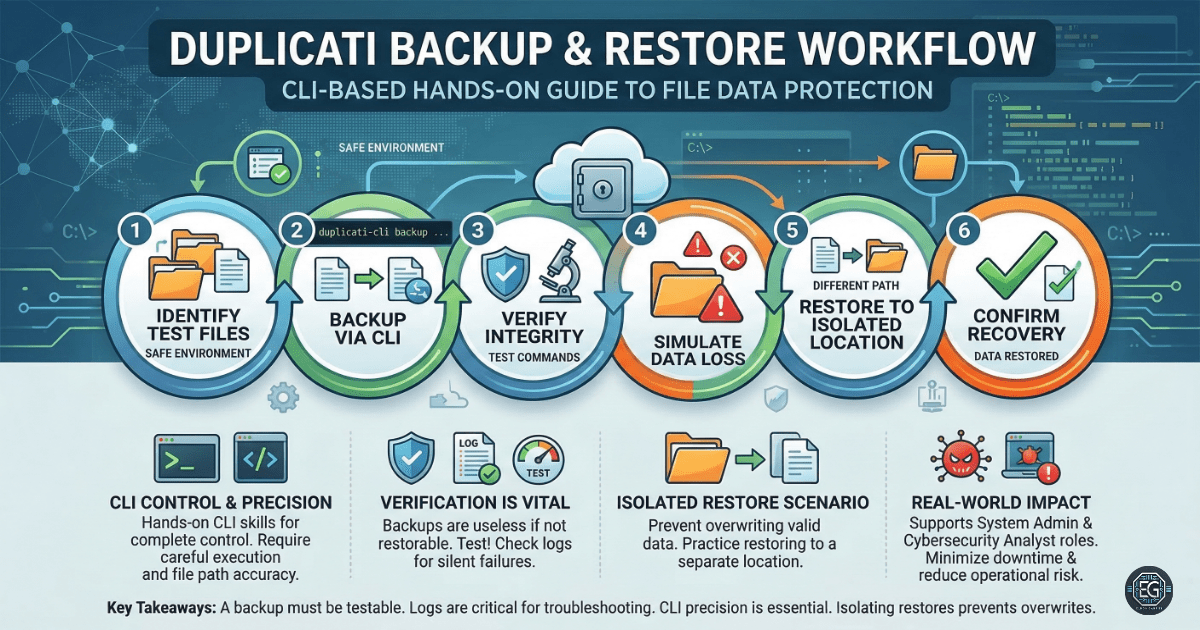
0.0 Executive Summary
This report documents the configuration and execution of a command-line interface (CLI) backup and restore workflow using Duplicati. The project successfully demonstrated the ability to prepare source data, execute encrypted backups, verify archive integrity, and perform full data restoration following a simulated loss event. The final result established a repeatable, scriptable process for secure data management and operational readiness in controlled environments.
1.0 Backup and Restore Workflow with Duplicati
1.1 Project Description
The objective of this task was to develop a hands-on proficiency with the Duplicati CLI for managing data lifecycles. The project aimed to move beyond GUI-based limitations by utilizing command-line arguments for backup, verification, and restoration. The environment focused on maintaining data integrity across temporary directories, simulating real-world data loss scenarios, and validating the recovery of original file states through automated CLI logs and metadata tracking.
1.2 Technical Task / Troubleshooting Process
The process focused on establishing a reliable backup chain and troubleshooting metadata inconsistencies during the restoration phase.
Key Actions & Observations
- CLI Execution: Utilized
Duplicati.CommandLine.exeto initiate backups with specific flags for target destinations and encryption. - Integrity Verification: Performed block-level verification of the backup archives to ensure no corruption occurred during the transfer.
- Data Loss Simulation: Manually purged source directories to test the effectiveness of the restoration commands.
- Log Analysis: Reviewed CLI-generated logs to troubleshoot missing or corrupted backup metadata and ensure incremental version tracking.
Root Cause: Potential restoration failures were identified as stemming from metadata conflicts, incorrect --restore-path arguments, or encryption key mismatches during the CLI handshake.
1.3 Resolution and Validation
Successful data recovery was achieved by utilizing isolated restore locations and maintaining consistent backup folder structures.
| Parameter | Configuration Value |
|---|---|
| Tool | Duplicati CLI |
| Encryption | AES-256 (Optional/Tested) |
| Primary Flag | –restore-path |
| Log Level | Verbose (for troubleshooting) |
Validation Steps
- Hash Comparison: Verified that restored files matched the original source data bit-for-bit.
- Metadata Audit: Confirmed that file attributes and version histories were correctly preserved in the Duplicati database.
- Repeatability Test: Executed the workflow in multiple temporary directories to ensure the PowerShell automation was consistent.
2.0: CONCLUSION
2.1 Key Takeaways
- CLI Flexibility: Command-line operations allow for more granular control and automation of backup schedules compared to standard GUIs.
- Verification Necessity: Backup completion does not guarantee recoverability; regular integrity checks are required to catch archive corruption.
- Metadata Awareness: Understanding how incremental changes are tracked is critical for resolving versioning errors during large-scale restores.
2.2 Security Implications & Recommendations
Risk: Backup Metadata Corruption Loss or corruption of the local backup database can prevent the CLI from identifying or assembling restored files.
Mitigation: Maintain clean, isolated backup directories and regularly export backup configurations to secure secondary storage.
Risk: Encryption Key Loss Utilizing CLI-based encryption without a managed password strategy results in permanent data loss if the keys are misplaced.
Mitigation: Carefully manage --no-encryption or passphrases through secure environment variables or a dedicated password manager.