

Duplicati Backup and Restore Workflow
What I Studied
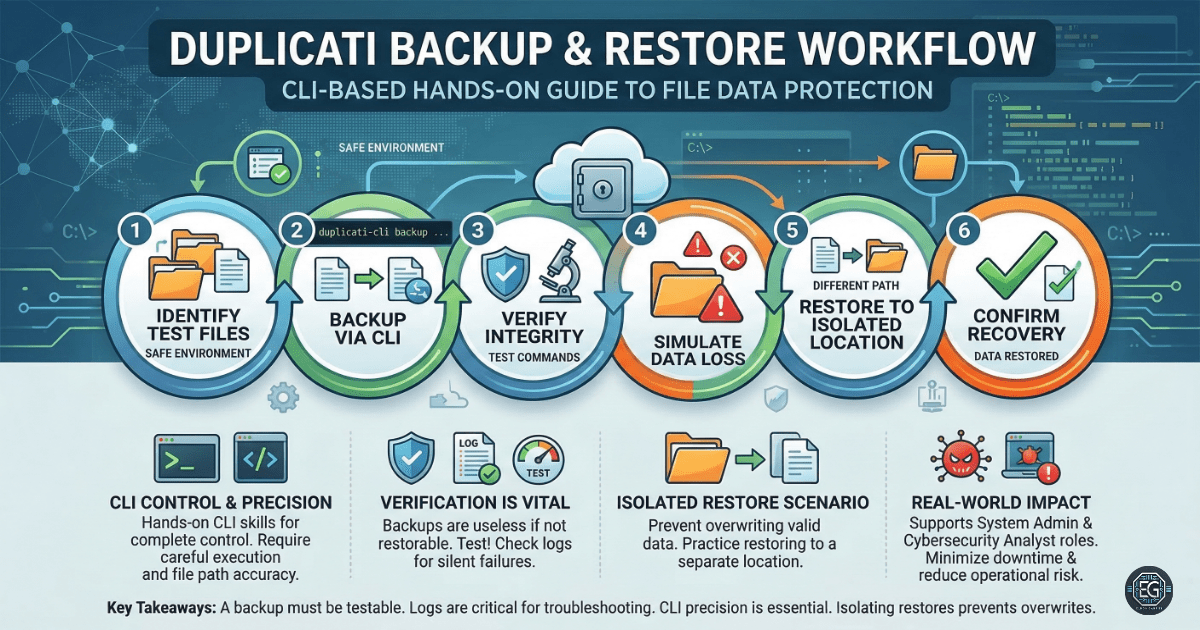
This exercise focuses on using Duplicati, a free backup tool, to create and restore file backups using a command line.
I worked through a full backup workflow in a safe test environment. This included:
- Creating test files to back up
- Running backup commands using the CLI
- Verifying backup integrity
- Simulating data loss
- Restoring files and confirming recovery
The goal was to understand how backups work, not simply click buttons and hope for the best.
What I Learned
Hands-on Skills
- Running backups using the Duplicati command line interface
- Verifying backup integrity using test commands
- Restoring files to a separate directory
- Navigating file structures to confirm recovery
Observations
- Backups are useless if you don’t test them
- The CLI gives better control than GUI tools, but also more room for mistakes
- Restoring to a different location helps prevent overwriting valid data
Troubleshooting Lessons
- Incorrect file paths can break both backup and restore operations
- Backup metadata must stay consistent or restores may fail
- Logs are critical for identifying silent failures
Why It Matters
In real environments, data loss occurs constantly. It could be:
- Accidental deletion
- System failure
- Ransomware attacks
A backup system is useful only if:
- The backup actually works
- The restore process is reliable
This exercise shows the following:
- Protect critical data
- Recover quickly from incidents
- Reduce downtime and operational risk
From a business perspective, this supports the following:
- Data availability
- System resilience
- Disaster recovery planning
How It Maps to the Job / Framework
Roles Reinforced
- System Administrator – Managing backups, recovery, and system reliability
- Cybersecurity Analyst – Supporting incident recovery and data protection
Practical Application
These skills apply directly to the following:
- Backup and recovery operations in enterprise environments
- Incident response scenarios where systems must be restored quickly
- Maintaining data integrity and ensuring business continuity
Key Takeaways
- A backup is only valuable if it can be restored successfully
- Testing backups is just as important as creating them
- Command-line tools provide control but require careful execution
- Isolating restore locations prevents accidental data overwrites
- Logs are essential for troubleshooting backup and restore issues
Related Projects
GUIDE – Backup and Restore Using Duplicati CLI – v1.0.1