
0.0 Executive Summary
This report describes the investigation of a DNS outage affecting a public-facing web domain.
The goal was to reduce downtime by identifying why DNS queries were failing and improving how DNS issues are monitored and diagnosed.
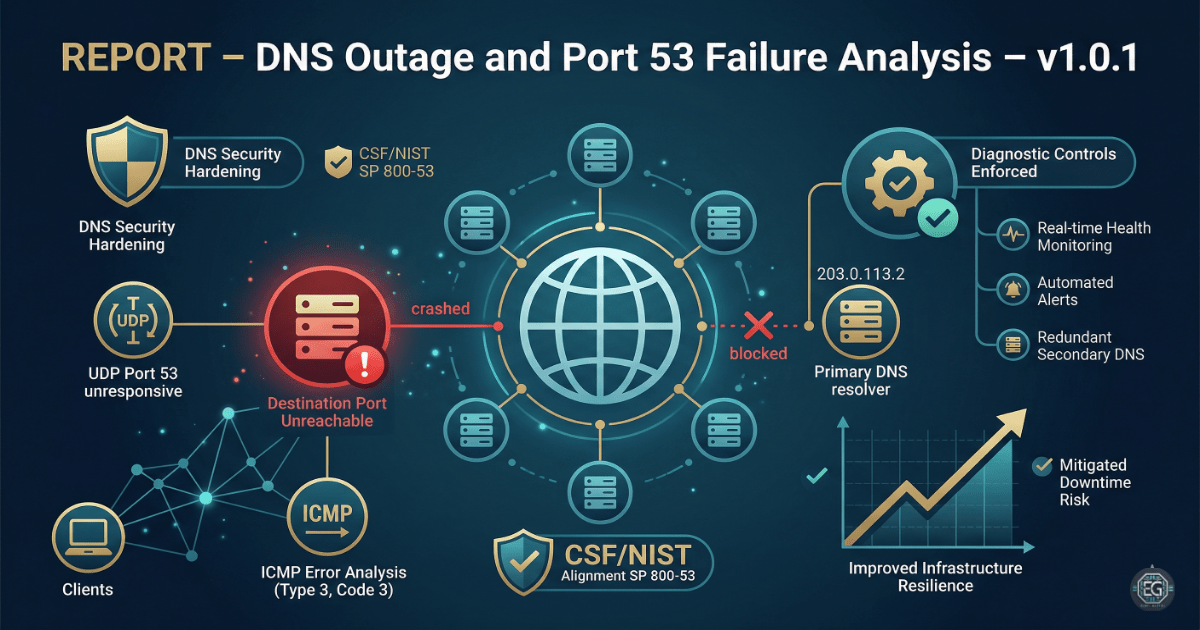
The final result is a clearer monitoring approach. Instead of reacting after users report issues, the system now checks for port-level failures on UDP port 53 and uses ICMP error messages to detect when the DNS service is not responding.
1.0 DNS Outage and Port 53 Failure Analysis
1.1 Project Description
The goal of this task was to create a structured way to troubleshoot DNS outages and prevent long service disruptions.
Network analysis was used to:
- Detect when DNS servers are not responding on port 53
- Identify ICMP error messages such as “Destination Port Unreachable”
- Confirm whether the DNS server is reachable and functioning properly
- Track packet-level responses from the primary resolver
These checks help ensure that users can still reach websites and services even if a DNS server fails or becomes unavailable.
1.2 Technical Task / Troubleshooting Process
This process focused on finding the cause of the DNS outage and confirming whether the issue was related to the DNS service itself or the network.
Key Actions & Observations
-
Tested DNS resolution for the target domain and found that the A record could not be resolved.
-
Monitored network traffic to observe DNS queries and responses.
-
Checked UDP port 53 to confirm whether the DNS server was responding.
-
Monitored ICMP traffic for error messages.
-
Applied checks against the DNS server at IP
203.0.113.2. -
Identified ICMP Type 3, Code 3 messages, which indicate that the destination port is unreachable.
-
Verified that the issue was not caused by client-side misconfiguration.
-
Documented all test steps to allow repeatable troubleshooting in future incidents.
Root Cause: The DNS server on the target IP was not responding on UDP port 53. This caused DNS queries to fail. The system also returned ICMP “Port Unreachable” messages, confirming that the service was offline or not functioning correctly. This issue was addressed by improving monitoring and ensuring redundancy in DNS infrastructure.
1.3 Resolution and Validation
The issue was analyzed and validated using network tools and observed behavior from the DNS server.
| Parameter | Configuration Value |
|---|---|
| Management Tool | Network Analyzer / dig / nmap |
| Control State | Enforced (Monitoring Mode) |
| Security Mode | Service Health Validation |
| Scope | Public DNS Infrastructure |
Validation Steps
-
Attempted to resolve the domain and observed repeated failures.
-
Confirmed ICMP “Destination Port Unreachable” messages from the DNS server.
-
Verified that the DNS service on the target IP was not responding on port 53.
-
Identified the need for backup DNS servers to maintain service availability.
-
Confirmed that adding redundancy would prevent similar outages in the future.
2.0: CONCLUSION
2.1 Key Takeaways
-
DNS failures can stop all related services from being accessible.
-
Monitoring port-level activity helps detect issues faster than waiting for user reports.
-
ICMP error messages provide useful information for identifying network and service problems.
-
Redundant DNS servers are necessary to prevent single points of failure.
2.2 Security Implications & Recommendations
Risk: Denial of Service (Service Failure)
If the DNS server is unavailable, users cannot access websites or services that depend on it.
Mitigation: Use multiple DNS servers in different locations to ensure availability.
Risk: Lack of Monitoring
If DNS service failures are not detected quickly, outages may last longer than necessary.
Mitigation: Set up real-time monitoring and alerts for port 53 availability and ICMP error responses.
Best Practices
- Limit access to DNS configuration files to prevent accidental or unauthorized changes.
- Use centralized management for DNS infrastructure and failover setup.
- Test DNS services after network or firewall changes to ensure traffic is not blocked.
- Document configurations and troubleshooting steps to support faster incident response.
Framework Alignment
- Supports NIST SP 800-53 for system and communication protection
- Aligns with ISO 27001 continuity requirements (A.17.1)
- Supports NIST CSF Detect and Respond functions by improving visibility into service failures